Intro
As IT pros, we’ve got no shortage of new / interesting and useful tools available to us. With the adoption of open-source software into consumer and enterprise environments, a lot of the tools are free! As long as you don’t need serious 24/7 support that is
How do you know which tools to use? COMMUNITY ! For me, that introduction came in 2017, I met Jonathan Pitre (twitter) while working in a previous job. Jon is Canada’s only CTA and has become a good friend since I met him in 2017. He opened my eyes to the “power of the community” that exists for EUC. Previously, I was aware of the EUC/CTA/CTP community by way of those awesome posts from the two Carl’s, but I wasn’t in the habit of regularly digesting the related blogs or going to events like Synergy or the like. Jon changed that REAL QUICK by letting me import his RSS blog list and also listed off a bunch of interesting tools he had used or was made aware of via the EUC community.
So, THANK YOU JON !!
This week, I checked another box off from Jon’s original list a few years back, Packer.io, and I’m glad I did. It’s amazing software. Also this week, I took https://osdbuilder.osdeploy.com for a spin, which provides a way to replace legacy dism commands and MDT
The challenges we face
Building windows 10 / server 201x images for cloning has the following challenges (at least as far as I’ve encountered)
- Human-error by hand cranking settings @ the virtual shell level
- Human-error by hand cranking settings post windows-build
- The amount of time it takes to apply windows updates once the base build is done
- Time that’s lost while waiting for steps 1/2/3 to complete
Each of the above challenges can be solved by combining a few simple tools that I will describe below
The solution
The solution I’ve found that worked for me is based on the open-source tool Packer
There’s a lot of marchitecture/jargon/nerd speak out there at the moment around dev-ops, CI/CD, “infrastructure as code. I’ve read plenty of posts online where the conversations contained so many acronyms, it made me question my command of the English language. It’s about time-savings and ensuring build consistency
The below steps are based on using Packer with vSphere, as it’s still the most common hypervisor for deploying Citrix workloads, and it happens to be what I use @ home on my VMUG licensed 3 node vSan cluster (<>shout out</>) There are official and community templates for Nutanix as well as all the major cloud platforms, but I’m only going to speak to what I know for this blog post, Packer + vSphere
When doing the work this week, I found that some of the reference blog pages and associated config files (.JSON/XML) for use with Packer had not been updated in a few years, so I definitely lost some time while troubleshooting, but, that’s how you learn! I can’t blame the authors of these blog posts ; how often do you go back and update your own blog posts? I’m guilty of this as well. If you’re reading this in the FUTURE and find that anything I’ve written below doesn’t work for you, please let me know in the comments or message me on twitter bird or email, I’ll try and help ya out! That’s community , baby !

Let’s get started with the proposed tools and proposed workflow at each stage to solve each of the 4 challenges I’ve listed above
Challenge 1: Standardizing VM shell settings
Here is our first case for use of the Packer tool. Packer uses .JSON based config files. These can be used to select the common shell values you select when manually creating a shell via the vSphere HTML5 client, or PowerCLI
Challenge 2: Standardizing windows install settings
Here, we will be using Microsoft autounattend.XML templates to pre-fill all the important settings that we would normally have to click / mouse through in a standard windows install.
Use of autounattend.XML files isn’t something new, but there are integration pieces that are possible by way of Packer integration which makes the autounttend.xml a lot more useful. You can use the Microsoft SDK and the Windows System image manager, but I’ve also got templates for Win 10 / Win 2019 server ready to use on my GIT hub HERE to save you having to create your own
Challenge 3: Windows updates last longer than it takes to make a drink a cup of coffee
OSDBuilder will be used to slipsteam in windows updates to our base ISO. As we are slipstreaming an offline image, we no longer need to reboot the live un-patched / out-of-date windows OS a bunch of times while we wait for each update to apply. This is a huge time-saver once combined with packer to attach the updated ISO
Challenge 4 – the time lost by waiting for each of the above 3 processes to complete
Again, Packer is here to help us out as the GLUE that ties it together! Packer is used to start step 1 and step 2, and thus fixes the issue with time lost in-between these steps
Detailed steps
Packer install/config
- Download Windows 10
/ Server 2019 trials from Microsoft - Download a recent copy of VMwareools.iso for windows
- Extract the VMware tools .zip , and rename windows.iso > vmwaretools.iso and upload to your preferred vSphere datastore folder
- Refer to the following YouTube video on how to create a slipstreamed ISO for Win 10 or Server 2019 using OSDBuilder
- Upload the slipstreamed / updated windows ISO(s) you created in step 2 for either Win 10 or Server 2019 to the same vSphere datastore as used in step 3The paths for these ISOs will be entered in your packer .JSON later
- Download the packer.exe from packer.IO HEREI found blog posts from 2017/2018 that reference the requirement to download 3rd party plug-ins for the vpshere APO. These are no longer required! The dev folks from the packer team integrated support for the vpshere API into the main packer.exe in Feb of 2020 (see GitHub post here)
- Extract it to c:\Program Files\Packer on your preferred build machine. I’m re-using an existing “build” machine that I use where I’ve got the Windows deployment toolkit / PDQ deploy installed
- Start > Run > Sysdm.cpl > Advanced > Environment variables > SYSTEM VARIABLES > PATH > EDIT
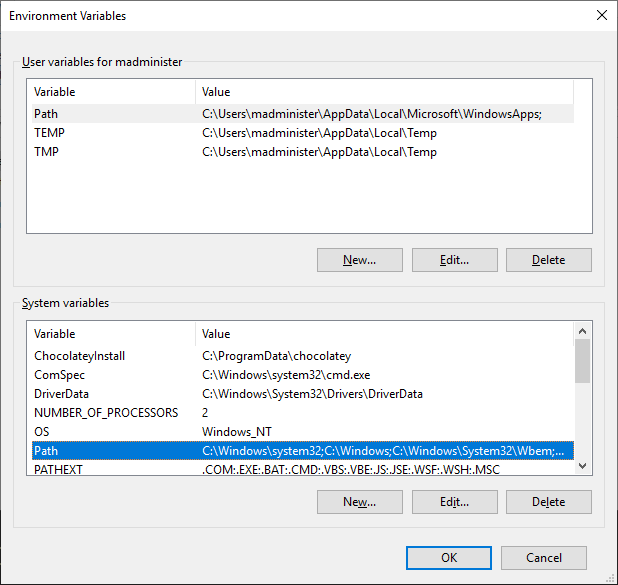
- Add the path to c:\Program Files\Packer
- Open my Build-Packer git hub repo HERE, download everything as a ZIP to your desktop
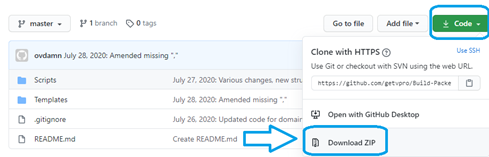
- Extract the contents with your favorite zip manager, and open the folder Build-Packer-master
- Move or copy the config/scripts folders to c:\Program Files\Packer
Windows Autounattnend.xml amendments
- Install / open Microsoft Visual Studio code
- For Server 2019 open:
c:\Program Files\Packer\Config\Autounattend\Server_2019\autounattend.xml
- For Win 10 open:
c:\Program Files\Packer\Config\Autounattend\Win10\autounattend.xml
- For the below edits, I’ve not included the line number, as it might change as updates to the related GIT hub repo are made. In all cases, use CTRL-F to search for the blow of text highlighted in yellow to find the entry
- First, you will need to edit the entries for your preferred language
- Amend the below line if you want a larger C drive size, just remember to amend within the associated packer .JSON file as well, covered in the later steps
- NOTE: From experience, and especially true with golden images for later use with RDS/Citrix worker roles, it’s best to do your base build in English (en-US) and add your local language after the fact via a language pack
<SetupUILanguage>
<UILanguage>en-US</UILanguage>
</SetupUILanguage>
<InputLocale>en-US</InputLocale>
<SystemLocale>en-US</SystemLocale>
<UILanguage>en-US</UILanguage>
<UserLocale>en-US</UserLocale
- Amend the below line if you want a larger C drive size, just remember to amend within the associated packer .JSON file as well, covered in the later steps
<CreatePartition wcm:action=”add”>
<Order>1</Order>
<Size>50</Size>
<Type>Primary</Type>
</CreatePartition>
- I’m using trial versions of Win 10 / Win 2019 in my lab, if you want to use licensed versions and plan on using KMS (Microsoft reference site) on your network to activate them, uncomment the below line. If you input a KMS key that doesn’t match your initial media, your build will fail. Yes, I made this mistake on my first day of building<ProductKey>
<!– <Key>6XBNX-4JQGW-QX6QG-74P76-72V67</Key> –>
<WillShowUI>OnError</WillShowUI>
</ProductKey>
-
Amend the below lines to include you preferred account name associated to the build, and org
<FullName>Win 2019 Packer Build</FullName>
<Organization>Your Org Name</Organization> -
Amend your time zone for wherever you are in the world
<TimeZone>Eastern Standard Time</TimeZone>
-
Amend the computer name as you see fit
<ComputerName>w2k19-packer</ComputerName>
- Change the below value as you see fit, else, you’ll be left with the default password, which is insecure by virtue of being shared on GITHUB
<AutoLogon>
<Password>
<Value>20SuperSecure3d20</Value>
<PlainText>true</PlainText>
</Password>
<LogonCount>2</LogonCount>
<Username>Administrator</Username>
<Enabled>true</Enabled>
</AutoLogon>
- Match the password set in step 23 in the below section
<AdministratorPassword>
<Value>20SuperSecure3d20</Value>
<PlainText>true</PlainText>
</AdministratorPassword>
- Note: Record the password used here, as it will be re-used in the related PACKER JSON file which we will edit when done with the autounattend.xml file
- Save the file. As well, I would suggest backing it up to a network location for safe keeping, the XML/JSON configs are the most important files in this process, if you corrupted or lost either at any point, it’s probably the most time consuming part of this entire process, and it’s no fun to have to re-create them. I’m saying this, as it happened to me I was writing this blog post
Packer JSON config amendments
- Using Notepad ++ or MS Visual Studio code, open the PACKER.JSON for Win 10 / Server 2019
-
If you want to use a different structure for your source scripts/config files, you will need to amend the following section under floppy_files
Otherwise, I would suggest leaving it. My own JSON template was culled from other templates for packer vpshere I found online, they all followed a similar formatting“floppy_files”: [
“config/Autounattend/Win10/autounattend.xml”,
“scripts/Start-FirstSteps.ps1”,
“scripts/Install-VMTools.ps1”,
“scripts/Start-DomainJoin.ps1”,
“scripts/Enable-WinRM.ps1”
]
-
If you want to convert your completed VM/windows install to a template at the end of the build, you can set the following value to “true”
“convert_to_template”: “false“,
-
Amend the path to vSphere datastore where you uploaded the vmwaretools.iso to in a previous step
“iso_paths”: [
“{{user `os_iso_path`}}”,
“CHANGE ME] CHANGE ME/vmwaretools.iso”
]
-
Edit variables section at the end of the file to match your environment
TIP: Having the “os_iso_path” on the same datastore where you VM will be created will speed up the process, same goes for the vmwaretools.iso“variables”: {
“os_iso_path”: “[CHANGE ME] CHANGE ME/WIN10_2004.ISO”,
“vm-cpu-num”: “2”,
“vm-disk-size”: “40960”,
“vm-mem-size”: “4096”,
“vm-name”: “WIN10-Packer”,
“vsphere-cluster”: “CHANGE ME”,
“vsphere-datacenter”: “CHANGE ME,
“vsphere-datastore”: “CHANGE ME”,
“vsphere-folder”: “CHANGE ME”,
“vsphere-network”: “VM Network”,
“vsphere-password”: “CHANGE ME”,
“vsphere-server”: “CHANGE ME”,
“vsphere-user”: “administrator@CHANGE ME”,
“winadmin-password”: “CHANGE ME”
}
NOTE: All guest OS types are listed HERE
Start Packer Build
- With the above XML/JSON files saved, it’s time to start the build
- On your build machine, open an admin PowerShell prompt and CD over the directory you installed packer and your config/script files to CD C:\Program Files\Packer
- Enable logging by the following two commands:
$env:PACKER_LOG=1
$env:PACKER_LOG_PATH=”packerlog.txt”
- Start the build by running the following for your chosen OS
Server:Packer.exe build config/json/server_2019.json
Win10:
Packer.exe build config/json/win_10.json
TIP: I found it useful to watch the process on two screens. Left screen where you’ve got your packer process running, right screen where you’re logged into vSphere
- The Packer.exe process should connect to your vSphere instance via an API call via the credentials you have in the JSON file you edited in the previous section
- Within vSphere you should see the new VM shell should be created within just a few seconds based on the settings you chose for vCPU, RAM, HDD size on datastore you choose, and the network you chose
- The new shell will have the VMware tools ISO attached, as well as either the win_10 / server_2019.ISO you uploaded in step 1 and defined in the .JSON config file
- A virtual floppy drive will be created on the remote shell, and all those scripts listed in the [floppy_files] section of the .JSON config that correspond to .ps1 scripts in “scripts” sub-folder on the machine where you’re running the packer.exe will be copied over to the remote shell
- The VM will boot up and be start the windows install via the ISO you specified
-
Here is what you should see on the machine running where you started the packer.exe process, Here is what you should see while you wait for windows to install
vsphere-iso: Creating VM…
vsphere-iso: Customizing hardware…
vsphere-iso: Mounting ISO images…
vsphere-iso: Creating floppy disk…
vsphere-iso: Copying files flatly from floppy_files
vsphere-iso: Copying file: autounattend.xml
vsphere-iso: Copying file: scripts/Install-VMTools.ps1
vsphere-iso: Copying file: scripts/Start-FirstSteps.ps1
vsphere-iso: Done copying files from floppy_files
vsphere-iso: Collecting paths from floppy_dirs
vsphere-iso: Resulting paths from floppy_dirs : []
vsphere-iso: Done copying paths from floppy_dirs
vsphere-iso: Uploading created floppy image
vsphere-iso: Adding generated Floppy…
vsphere-iso: Set boot order temporary…
vsphere-iso: Power on VM…
vsphere-iso: Waiting for IP…
- The Windows setup is hard-coded to scan all removable drive sources for an autounattend.XML. In this case, we’ve got the floppy drive mounted, so A:\autounattend.xml will be located and parsed
- As long as there aren’t any type-o’s or formatting errors from editing the autounattend.xml for your environment, the windows install should be completely automated all the way to the desktop logon. In my own environment, the build process takes about 9 minutes, which I’m quite happy with. It’s faster than it takes me to take my dog outside, which is a good test
- Based on the <autologon> that was set within the autounattend.xml file template I provided on git hub, the newly created windows VM will logon and start processing the various <SynchronousCommand> entries listed.
- Of these commands, there are 4 entries that are hard-coded to run the .ps1 scripts from the virtual A:\ drive that was created earlier in the process. They are as follows:
- Start-FirstSteps.ps1 will run and go through some basic packer > windows integration steps that I consolidated from the Guillermo Musumeci’s GIT REPO
- The second script Install-VMTools.ps1 is critical, and I spent some time this week to refine the process by which VMware Tools is installed on a windows machine. It’s been a long-standing issue where the windows VMware tools package will install the drivers correctly when called using:
Start-Process “setup64.exe” -ArgumentList ‘/s /v “/qb REBOOT=R”‘ -Wait - However!!!! the actual windows service called “VMWARE tools” which packer requires to finish the build will sometimes fail to install on the first attempt. To get around this, I found a great script which has logic to detect for this scenario and re-install VMware tools as required. Thanks Tim ! My script has a few edits which I made for use with my own packer builds
-
The third script is Start-DomainJoin.ps1. This script doesn’t actually start the AD domain join process, rather, it copies the script to a new directory called c:\scripts on the newly created windows install, and creates on a shortcut on the desktop called “Join Active Directory”
This can be called later if you choose to actually join your AD environment, you would just need to enter in valid AD domain admin creds and a domain name, once it’s done, it will delete the shortcut on the admin desktop
- The final script processed by our autounattend.xml is Enable-WinRM.ps1. Like the Install-VMtools.ps1 script, this one is critical for packer integration. WinRM is used from the remote packer instance to the newly created shell / windows install to finalize the build
- Once the Enable-WinRM.ps1 script has completed, your running packer.exe process should recognize the remote IP of the newly created VMware shell, and initiate the final steps, which is to disconnect the floppy/CDROM drives and power off the VM
-
Here is what you should see towards the end of the process for a successful build
vSphere-iso: IP address: 192.168.1.172
vSphere-iso: Using winrm communicator to connect: 192.168.1.172
vSphere-iso: Waiting for WinRM to become available…
vSphere-iso: WinRM connected
vsphere-iso: Connected to WinRM!
Vsphere-iso: Provisioning with windows-shell…
vsphere-iso: Provisioning with shell script: C:\Users\admin\AppData\Local\Temp\windows-shell-provisioner225687659
vsphere-iso: C:\Users\administrator\ipconfig
vsphere-iso: Windows IP Configuration
vsphere-iso: Ethernet adapter Ethernet:
vsphere-iso: Connection-specific DNS Suffix . : yourdomain.LOC
vsphere-iso: Link-local Ipv6 Address . . . . . : fe80::18e2:5f3a:617e:8573%6
vsphere-iso: Ipv4 Address. . . . . . . . . . . : 192.168.1.172
vsphere-iso: Subnet Mask . . . . . . . . . . . : 255.255.255.0
vsphere-iso: Default Gateway . . . . . . . . . : 192.168.1.10
vsphere-iso: Shutting down VM…
vsphere-iso: Deleting Floppy drives…
vsphere-iso: Deleting Floppy image…
vsphere-iso: Eject CD-ROM drives…
vsphere-iso: Clear boot order…
Build ‘vsphere-iso’ finished.
- That’s it! You can boot the VM up again for the next stage of whatever build steps you want to do. Join to the domain, run windows updates, install language packs or convert it to a template for re-use creating more clones, but you’re basic build should now be completed
Troubleshooting
Failures that occur with the PACKER JSON FILE
- Ensure that you’ve got your floppy_files section formatted correctly based on the folder structureDon’t forget any “,” on your lines! The packer.exe will tell you, and give the line reference, ensure you’re doing your edits in a proper editor, Visual studio code or Notepad ++
- Ensure you’ve set ALL of the below correctly
-
The below 5 files should be saved to like-named folders where you packer.exe is extracted to. If they are missing, packer will bail out
“floppy_files”: [
“config/Autounattend/Win10/autounattend.xml”,
“scripts/Start-FirstSteps.ps1”,
“scripts/Install-VMTools.ps1”,
“scripts/Start-DomainJoin.ps1”,
“scripts/Enable-WinRM.ps1”
] -
The below values are case-sensitive , ensure you match them exactly as they are set within vpshere. I would suggest using TWO screens for this part
“variables”: {
“os_iso_path”: “[CHANGE ME] CHANGE ME/WIN10_2004.ISO”,
“vm-cpu-num”: “2”,
“vm-disk-size”: “40960”,
“vm-mem-size”: “4096”,
“vm-name”: “WIN10-Packer”,
“vsphere-cluster”: “CHANGE ME”,
“vsphere-datacenter”: “CHANGE ME,
“vsphere-datastore”: “CHANGE ME”,
“vsphere-folder”: “CHANGE ME”,
“vsphere-network”: “VM Network”,
“vsphere-password”: “CHANGE ME”,
“vsphere-server”: “CHANGE ME”,
“vsphere-user”: “administrator@CHANGE ME”,
“winadmin-password”: “CHANGE ME”
}
}
Failures that occur with the Windows Autounattend.xml file
- I’ve indicated the key edits you need to do within the related win 10 / server 2019 XML files
- The main one that comes up, is the password, it needs to set in 3 places, shown below
- The password provided in the script needs to be amended for your own environment, I would suggest using a password manager, or LAPS, but don’t leave the default !
-
Once you’ve chosen the updated password, amend it in the corresponding packer .JSON file as well
<AutoLogon>
<Password>
<Value>20SuperSecure3d20</Value>
<PlainText>true</PlainText>
</Password>
<LogonCount>2</LogonCount>
<Username>Administrator</Username>
<Enabled>true</Enabled>
</AutoLogon>
After </OOBE> section
UserAccounts>
<AdministratorPassword>
<Value>20SuperSecure3d20</Value>
<PlainText>true</PlainText>
</AdministratorPassword>
<LocalAccounts>
<LocalAccount wcm:action=”add”>
<Password>
<Value>ChangeME</Value>
<PlainText>true</PlainText>
</Password>
<Group>administrators</Group>
<DisplayName>YourOtherAdminAccountHere</DisplayName>
<Name>YourOtherAdminAccountHere</Name>
<Description>Custom local admin</Description>
</LocalAccount>
</LocalAccounts>
</UserAccounts>
Failures that occur after the windows build has completed, but before Packer has finished it’s final steps
- Here’s one I ran into this week. If you see the remote packer.exe process in the below state where it’s “waiting for WinRm to become available”
vsphere-iso: Waiting for IP…
vsphere-iso: IP address: 192.168.1.180
vsphere-iso: Using winrm communicator to connect: 192.168.1.180
vsphere-iso: Waiting for WinRM to become available…
- This might be due to amending the vSphere-network from it’s default of “VM Network” to a VLAN that was filtering out various TCP ports
- In the case I observed, once the VM was moved to the normal “VM Network” the issue was resolved.
-
So, you’ve got two choices, leave the build on the “VM Network” default shown below, or ensure that you’ve got the ports for WinRM open TCP 5985
“variables”: {
“os_iso_path”: “[CHANGE ME] CHANGE ME/WIN10_2004.ISO”,
“vm-cpu-num”: “2”,
“vm-disk-size”: “40960”,
“vm-mem-size”: “4096”,
“vm-name”: “WIN10-Packer”,
“vsphere-cluster”: “CHANGE ME”,
“vsphere-datacenter”: “CHANGE ME,
“vsphere-datastore”: “CHANGE ME”,
“vsphere-folder”: “CHANGE ME”,
“vsphere-network”: “VM Network”,
“vsphere-password”: “CHANGE ME”,
“vsphere-server”: “CHANGE ME”,
“vsphere-user”: “administrator@CHANGE ME”,
“winadmin-password”: “CHANGE ME”
}
}
Closing
Please let me know if you found this blog post useful in the comments or on twitter
The process was pulled together on the week of July 20th , 2020. I read over a bunch of blog posts and consulted the excellent forums on the packer.io site. To get it all working, much of the refined process came down to trial/error. I believe practical knowledge is key to success in our industry
I’m really impressed with Packer thus far, the only “cost” was the time spent learning it, and will easily pay-out as I continue to use for build automation. Here, I’ve only covered using it with vSphere, but the packer folks support integration with dozens of the platforms, the sky is the limit
Have a nice day!
 Owen Reynolds Personal blog
6 responses to “10 min Windows 10 / Server 2019 build automation via OSDBuilder, autounattend.xml and Packer.IO”
Have you tried to
Net stop “Vmware tool service name”
Net start “Vmware tool service name”
In the good old days this was the trick when installing printer drivers without rebooting.
So perhaps it would help here as well
LikeLike
Hey Soren! That’s the thing, the VMware tools service doesn’t actually get installed on the first attempt! It’s quite frustrating, the VMware tools script I provided only adds another 15 seconds to the install, it just feels messy to use it. However, if the VMware tools service doesn’t get installed, the full packer build will eventually time-out, and the VM will be deleted by the packer.exe instance running on your remote machine
LikeLike
[…] critical to home lab infra, so I’ll probably just re-build them using a golden image, or packer which I learned last year […]
LikeLike
G:\Packer.io>packer.exe build config/json/Win10_21H2_BIOS.json
vsphere-iso: output will be in this color.
==> vsphere-iso: Creating VM…
Build ‘vsphere-iso’ errored after 303 milliseconds 210 microseconds: error creating vm: A general system error occurred: PBM error occurred during PreCreateCheckCallback: Connection refused
==> Wait completed after 303 milliseconds 210 microseconds
==> Some builds didn’t complete successfully and had errors:
–> vsphere-iso: error creating vm: A general system error occurred: PBM error occurred during PreCreateCheckCallback: Connection refused
==> Builds finished but no artifacts were created.
LikeLike
Hello! I’ve not seen this error before, apologies for my slow reply, I had not viewed my recent comments. How did you fix this error? For issues I wasn’t able to solve when i first started using Packer in 2021, I posted to the related hashicorp packer forums
LikeLike
[…] Last year, I wrote a long post about using Packer.IO to automate basic VMware shell creation and Win 10 / Win 2019 installation. At that time, I only ended up using the solution for re-builds on own home lab. This year, I’ve had the need to build golden images for multiple clients, each time, the process was manual and error prone as no automation was used. In the last week of Nov 2021, I decided to sit down last week and re-visit my packer / Powershell windows build templates.I’m very happy to share that I’ve got automation in place to deliver a fully built / base optimized / bi-lingual (En/Fr) / windows patched Windows EFI image in approx 25 minutes. Last year, the builds were about 10 mins, but didn’t do HAVE of what I have now. Let’s get into it!For reference, here was the blog post from last year on packer / windows build automation for VMware environments […]
LikeLike